

Description
3D Model Search Tool for Web Browsing
Overview
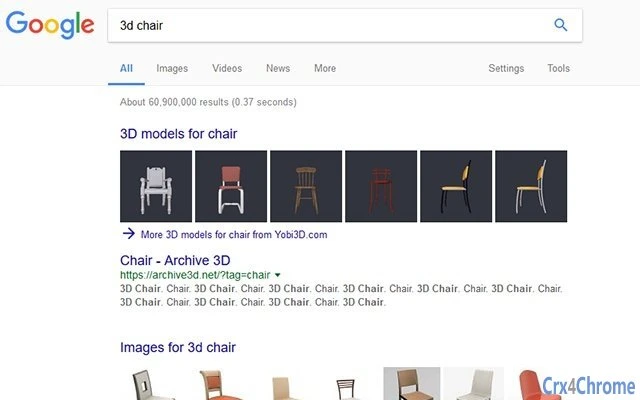
The software is a browser extension designed to enhance web search experiences by enabling users to search for 3D models directly from their browser. By typing keywords related to 3D content—such as "3D model," "3D object," or "3D design"—into any search engine, the extension triggers a search on Yobi3D.com. This allows users to quickly access a curated collection of 3D assets without leaving their current workflow. The tool is particularly useful for designers, developers, educators, and hobbyists who frequently seek 3D resources for creative or technical projects.
It operates as a seamless integration within existing web browsers, requiring no complex setup. The developer did not provide additional details about the company or background. Real-world usage scenarios include finding 3D assets for game development, architectural visualization, 3D printing, or educational presentations. The extension is lightweight and designed to work across multiple platforms, making it accessible to a broad audience of digital creators.
Key Features & Capabilities
- 3D Search Integration – Automatically redirects search queries containing 3D-related keywords to Yobi3D.com, streamlining access to 3D model repositories.
- Keyword Customization – Users can define which terms trigger the search redirection, allowing for personalized filtering based on project needs.
- Browser Extension Format – Designed for easy installation and use across supported browsers on Windows, Mac, and Linux.
- Lightweight Design – With a file size of 1.5 MB, the extension imposes minimal impact on browser performance.
- Multi-Platform Support – Functions consistently across Windows, Mac, and Linux operating systems.
For example, when a user types "3D chair model" into Google, the extension identifies the keywords and redirects the search to Yobi3D.com. This eliminates the need to manually navigate to a specialized 3D search site. The customization feature allows advanced users to set specific triggers such as "3D printable" or "CAD model" to refine results. The tool is especially effective for professionals who require rapid access to high-quality 3D assets during design sprints or project development.
User Interface, Workflow & Performance
The user interface is minimal and integrated directly into the browser’s extension menu. It features a clean, unobtrusive design that does not interfere with browsing activities. Navigation is straightforward: once installed, the extension runs in the background, monitoring search queries. No additional configuration is required for basic functionality.
Workflow efficiency is high, as the extension reduces the number of steps needed to access 3D content. Users can continue working in their preferred search engine while the extension handles the redirection. The developer did not specify resource usage details, so exact performance impact on CPU or RAM remains unknown. However, the small file size suggests optimized code and low overhead. Stability is expected to be consistent, given the extension’s simple logic and lack of complex processing.
Compatibility & System Requirements
The software is compatible with Windows, Mac, and Linux operating systems. It is designed as a browser extension, meaning it relies on the host browser’s environment for execution. The installation size is 1.5 MB, which is considered small for a browser add-on.
Exact system requirements were not listed. Compatibility information was partially provided, and no specific hardware specifications were mentioned. The extension is intended for use with modern web browsers that support extensions. Users should ensure their browser is up to date for optimal performance. Platform compatibility is confirmed across the three major desktop operating systems.
Pros and Cons
Pros
- Effortlessly integrates 3D model searches into everyday web browsing
- Customizable keyword triggers for tailored search results
- Lightweight at just 1.5 MB
- Available on Windows, Mac, and Linux
- Free to download and use
Cons
- Does not provide advanced filtering or sorting options within the extension
- Relies entirely on external website (Yobi3D.com) for content
- Limited customization beyond keyword selection
- No offline functionality available
- Performance behavior under heavy browser usage not specified
FAQ Section
Is the software free to use?
Yes, the software is available at no cost. It is distributed as a free browser extension with no hidden fees or subscription models.
Which operating systems are supported?
The extension is compatible with Windows, Mac, and Linux. It functions through supported web browsers on these platforms.
Can I use this tool offline?
No, the extension requires an active internet connection to redirect searches to Yobi3D.com. It cannot function without online access.
How do I customize the keywords that trigger a search?
After installation, users can access the extension settings to define which keywords will initiate a search on Yobi3D.com. This allows for personalized search triggers based on project needs.
Is the software secure?
The extension operates within the browser’s security model and does not collect personal data. It redirects searches to Yobi3D.com, which is the primary source of content. Users are advised to review the privacy policy of Yobi3D.com for further details.
Final Thoughts + CTA
This browser extension offers a practical solution for anyone who regularly searches for 3D models online. Its seamless integration with standard search engines and ability to redirect queries to Yobi3D.com saves time and enhances productivity. While it lacks advanced filtering or offline capabilities, its simplicity and cross-platform availability make it a valuable tool for designers, developers, and educators.
For users seeking a fast, no-frills way to access 3D content from their browser, this tool delivers on its core promise. The free model and lightweight design further strengthen its appeal. If you frequently search for 3D assets, this extension can significantly streamline your workflow.
Download 3D Model Search Tool for Web Browsing now.
Guides & Tutorials for 3D Models Search Engine - Yobi3D Extension for Chrome
How to install 3D Models Search Engine - Yobi3D Extension for Chrome
- Click the Preview / Download button above.
- Once redirected, accept the terms and click Install.
- Wait for the 3D Models Search Engine - Yobi3D Extension for Chrome download to finish on your device.
How to use 3D Models Search Engine - Yobi3D Extension for Chrome
This software is primarily used for its core features described above. Open the app after installation to explore its capabilities.
User Reviews for 3D Models Search Engine - Yobi3D Extension for Chrome 0
No reviews found





